Back to posts
Updated

How to use JWT and OAuth with Spring Boot


Unsure how to share authentication state between stateless microservices? This post will try to answer these questions using Spring Boot, Spring Security (OAuth2) and JSON Web Tokens (JWT).

OAuth

OAuth defines a standard contract of providing token based authentication and authorization on the internet.

It defines a protocol for notifying a resource provider ( Facebook ) that the resource owner ( you ) grants access to their information ( e.g your email ) to a third-party application ( e.g a Web App )

The OAuth standard defines several Grant Flows, this post will focus on the Authorization Code Grant. The flow is well suited to traditional web applications that has server side session storage. Modern single page javascript applications will be better suited to the Implicit Grant, which is not covered here.

Authorization Code Grant
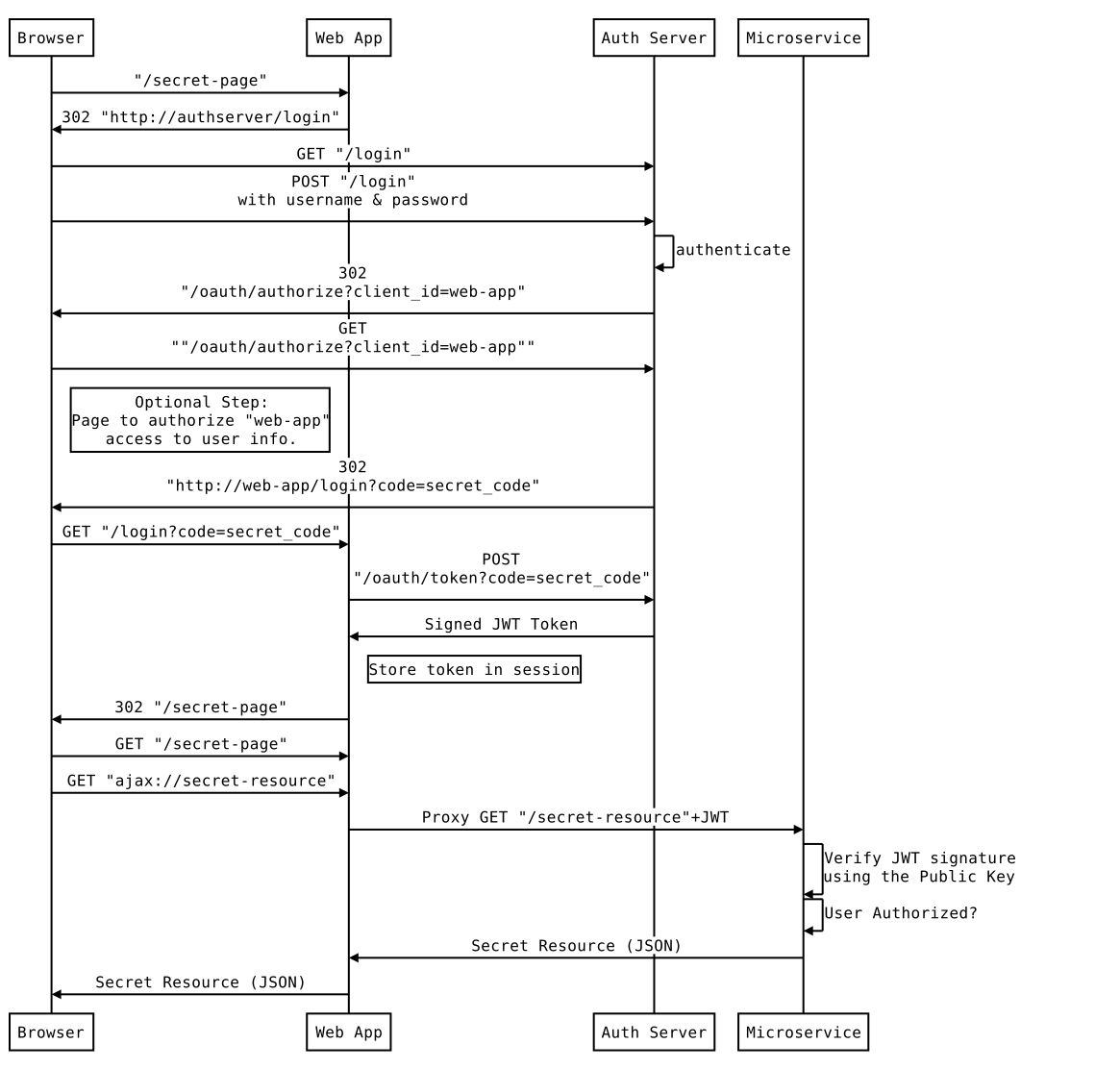
authorization code flow

The diagram depicts the interaction between the 3 main components of the system, Auth Server, Web App and a Microservice. A JWT token encapsulates the identity of the authenticated user and is only passed between the system components, never to the browser. The token is stored in the HTTP Session of the Web App which is maintained through a traditional session id Cookie.

Strictly speaking the Authorization Code Grant flow is complete after the secret_code has been exchanged for a JWT. The rest of the diagram shows how the Web App proxies requests to the Microservice and passes the JWT along.

The optional “authorize” step is useful in cases where the Resource Provider (Facebook) cannot vouch for the credibility of the 3rd party application requesting access, thereby delegating the decision to the Resource Owner (the User). In some cases, it also provides an opportunity to the Resource Owner to review what information is requested by the application.

JWT

JWT is an open standard for securely sending information (Claims) between parties. The information can be verified and trusted because it is digitally signed, using a public / private key pair in this instance.

JWT consists of 3 parts separated by a ., the header, payload and the signature.

The payload is a combination of:

  • Registered Claims - keys reserved by the JWT Spec.
  • Public Claims which can be defined by the application.

Below is a rough example of how JWT is composed:

jwt.js
var header = {
  "alg": "RS256",
  "typ": "JWT"
};

var payload = {
  "exp": 1480395277,      //Reserved claim - Expiration time
  "user_name": "reader",  //Public claim
  "authorities": [        //Public claim
    "ROLE_READER"
  ],
  "jti": "5acda3f8-4c85-4000-a01f-b92a3738197a", //Reserved claim - JWT ID
  "client_id": "web-app", // Public claim
  "scope": [              // Public claim 
    "read"
  ]
};

var encodedString = base64UrlEncode(header) + "." + base64UrlEncode(payload);
var privateKey = 'secret private key...';
var signature = SHA256withRSA(encodedString, privateKey);
var JWT = encodedString + "." + base64UrlEncode(signature);

Sample System Architecture

boot auth architecture

Auth Server

The Auth Server will provide authentication and play the role of the Resource Provider. A Java keystore (Public + Private keys) is packaged into the server and is used to sign the JWT.

The approval step is skipped since interaction is between trusted applications.

Generate the keystore in auth-server/src/main/resources:

$ keytool -genkeypair -alias jwt -keyalg RSA -dname "CN=jwt, L=Brisbane, S=Brisbane, C=AU" -keypass mySecretKey -keystore jwt.jks -storepass mySecretKey

The Spring context configuration for the Auth Server consists of two parts, the WebSecurityConfig and OAuth2Configuration.

WebSecurityConfig configures a basic form based login page. Furthermore it secures all OAuth endpoints exposed by the Auth Server. For simplicity’s sake an in memory store of users is also included.

WebSecurityConfig.groovy
    @Configuration
    @Order(-20)
    static class WebSecurityConfig extends WebSecurityConfigurerAdapter {

        @Override
        @Bean
        AuthenticationManager authenticationManagerBean() throws Exception {
          super.authenticationManagerBean()
        }

        @Override
        protected void configure(HttpSecurity http) throws Exception {
            http
                    .formLogin().loginPage('/login').permitAll()
                    .and().httpBasic().and()
                    .requestMatchers()
                    //specify urls handled
                    .antMatchers("/login", "/oauth/authorize", "/oauth/confirm_access")
                    .antMatchers("/fonts/**", "/js/**", "/css/**")
                    .and()
                    .authorizeRequests()
                    .antMatchers("/fonts/**", "/js/**", "/css/**").permitAll()
                    .anyRequest().authenticated()
        }

        @Override
        protected void configure(AuthenticationManagerBuilder auth) throws Exception {
            auth.inMemoryAuthentication()
                    .withUser('reader')
                    .password('reader')
                    .authorities('ROLE_READER')
                    .and()
                    .withUser('guest')
                    .password('guest')
                    .authorities('ROLE_GUEST')
        }
    }

OAuth2Configuration configures the required OAuth endpoints for the Authorization Code Grant flow. Additionally it takes care of setting up the JWT token store and the key pair used to sign the tokens.

OAuth2Configuration.groovy
    @Configuration
    @EnableAuthorizationServer
    static class OAuth2Configuration extends AuthorizationServerConfigurerAdapter {

        @Autowired
        @Qualifier('authenticationManagerBean')
        AuthenticationManager authenticationManager


        @Override
        void configure(ClientDetailsServiceConfigurer clients) throws Exception {
            clients.inMemory()
                    .withClient('web-app')
                    .scopes('read')
                    .autoApprove(true)
                    .accessTokenValiditySeconds(600)
                    .refreshTokenValiditySeconds(600)
                    .authorizedGrantTypes('implicit', 'refresh_token', 'password', 'authorization_code')
        }

        @Override
        void configure(AuthorizationServerEndpointsConfigurer endpoints) throws Exception {
            endpoints.tokenStore(tokenStore()).tokenEnhancer(jwtTokenEnhancer()).authenticationManager(authenticationManager)
        }


        @Bean
        TokenStore tokenStore() {
            new JwtTokenStore(jwtTokenEnhancer())
        }

        @Bean
        protected JwtAccessTokenConverter jwtTokenEnhancer() {
            KeyStoreKeyFactory keyStoreKeyFactory = new KeyStoreKeyFactory(
                    new ClassPathResource('jwt.jks'), 'mySecretKey'.toCharArray())
            JwtAccessTokenConverter converter = new JwtAccessTokenConverter()
            converter.setKeyPair(keyStoreKeyFactory.getKeyPair('jwt'))
            converter
        }
    }

Web App

The Stateful Web App hosts the view (HTML,JS and CSS) of the application. The default, in memory, implementation of HTTP Session is used to store JWT Tokens.

As with the Microservice, this app contains a shared public key to verify the signature on the JWT.

The role of an API Gateway is provided by a ZUUL Proxy and has a dual purpose:

  • Automatically attach the JWT to the authorization header before proxying an API request
  • Prevent the need for CORS configuration between the browser and the Microservice.

Both the ZUUL Proxy and the public key can be configured in src/main/resources/application.yml

To extract the public key from the keystore created for the Auth Server (keystore password is ‘mySecretKey’):

$ keytool -list -rfc --keystore boot-auth-server/src/main/resources/jwt.jks | openssl x509 -inform pem -pubkey

<Gist id="f4a40ed09bf1258a5725c3c214e85fef" />

and the Spring configuration:

WebApplication.groovy
@SpringBootApplication
@EnableOAuth2Sso
@EnableZuulProxy
class WebApplication
        extends WebSecurityConfigurerAdapter
{

    @Override
    public void configure(HttpSecurity http) throws Exception {
        http.logout().and().antMatcher("/**").authorizeRequests()
                .antMatchers("/login","/auth/**").permitAll()
                .anyRequest().authenticated().and().csrf().disable()
    }

    public static void main(String[] args) {
        SpringApplication.run WebApplication, args
    }
}

Microservice

The Microservice is a stateless application that exposes a single API endpoint. Invoking the endpoint will produce JSON with a random UUID and the name of the current authenticated user. This is automatically extracted from the JWT in the authorization header.

The Microservice also demonstrates authorization, by only allowing users with the ROLE_READER authority to access the resource.

application.yml
server:
  port: 9992

security:
  sessions: stateless
  user:
    password: none
  oauth2:
    resource:
      jwt:
        keyValue: |
          -----BEGIN PUBLIC KEY-----
          MIIBIjANBgkqhkiG9w0BAQEFAAOCAQ8AMIIBCgKCAQEAimUKhvBhsoeSM3HkIOP/Y3RXjvonBlZnLj8oO92TyAKG53lmAoK0wZ5MTZPsfrOz2Z7CeAp6mPhUANX2RUoFwVzG7rJmgWyqGmGFNBmtYL+uVqQ80TzWi5zyzXTxgVMWiCqqw/u4AeE1qhN8chnGwhUBnpgPAPd8v57mIwg0n5JxjdYe7pgHlpvt8ZXTXd1KBxB5K7WjNlCfMf75ZEeBaplxsSfJUwKbnHQKWcY3NnpjkVR8y4jviAbkOHmGMaliM7fcsLzbosBUPDQuNlvYdjPBRfH6MMPeXRW6On3u0Um9wIYmkQS+AEgHCq4UuLOnTTqqxnGkwFYeMAAXmRyMtQIDAQAB
          -----END PUBLIC KEY-----

Spring configuration:

MicroserviceApplication.groovy
@SpringBootApplication
@RestController
class MicroserviceApplication {

    @RequestMapping(value = '/{id}', method = RequestMethod.GET)
    public Map readFoo(@PathVariable Integer id, Principal principal) {
        [
                id: id,
                resource: "${UUID.randomUUID()}" as String,
                user: principal.getName()

        ]
    }

    @Configuration
    @EnableResourceServer
    public static class ResourceServiceConfiguration extends ResourceServerConfigurerAdapter {

        @Override
        void configure(HttpSecurity http) throws Exception {
            http.csrf().disable()
                    .authorizeRequests()
                    .antMatchers("/**").hasAuthority('ROLE_READER')
        }

    }

    public static void main(String[] args) {
        SpringApplication.run(MicroserviceApplication.class, args)
    }
}

Running the Sample Application

All the code for the sample application is hosted on GitHub and can be run using gradle.

$ git clone git@github.com:monkey-codes/spring-boot-authentication.git
$ cd spring-boot-authentication
$ ./gradlew bootRun --parallel

Web App starts at http://localhost:8080:/web-app

References

http://stytex.de/blog/2016/02/01/spring-cloud-security-with-oauth2/
https://spring.io/guides/tutorials/spring-boot-oauth2/
https://spring.io/blog/2015/02/03/sso-with-oauth2-angular-js-and-spring-security-part-v
https://scotch.io/tutorials/the-anatomy-of-a-json-web-token